This recipe assumes your backend owns both paths: Intercom Developer Hub sends webhooks to your URL so you can link PostHog sessions to Intercom conversations; the same service consumes Autoplay’s SSE stream and calls Intercom’s API to write internal notes.
Want Autoplay to set this up for you (webhooks, stream credentials, Intercom wiring), or need help with this recipe? Join the Autoplay Slack workspace and post in #just-integrated. Final result
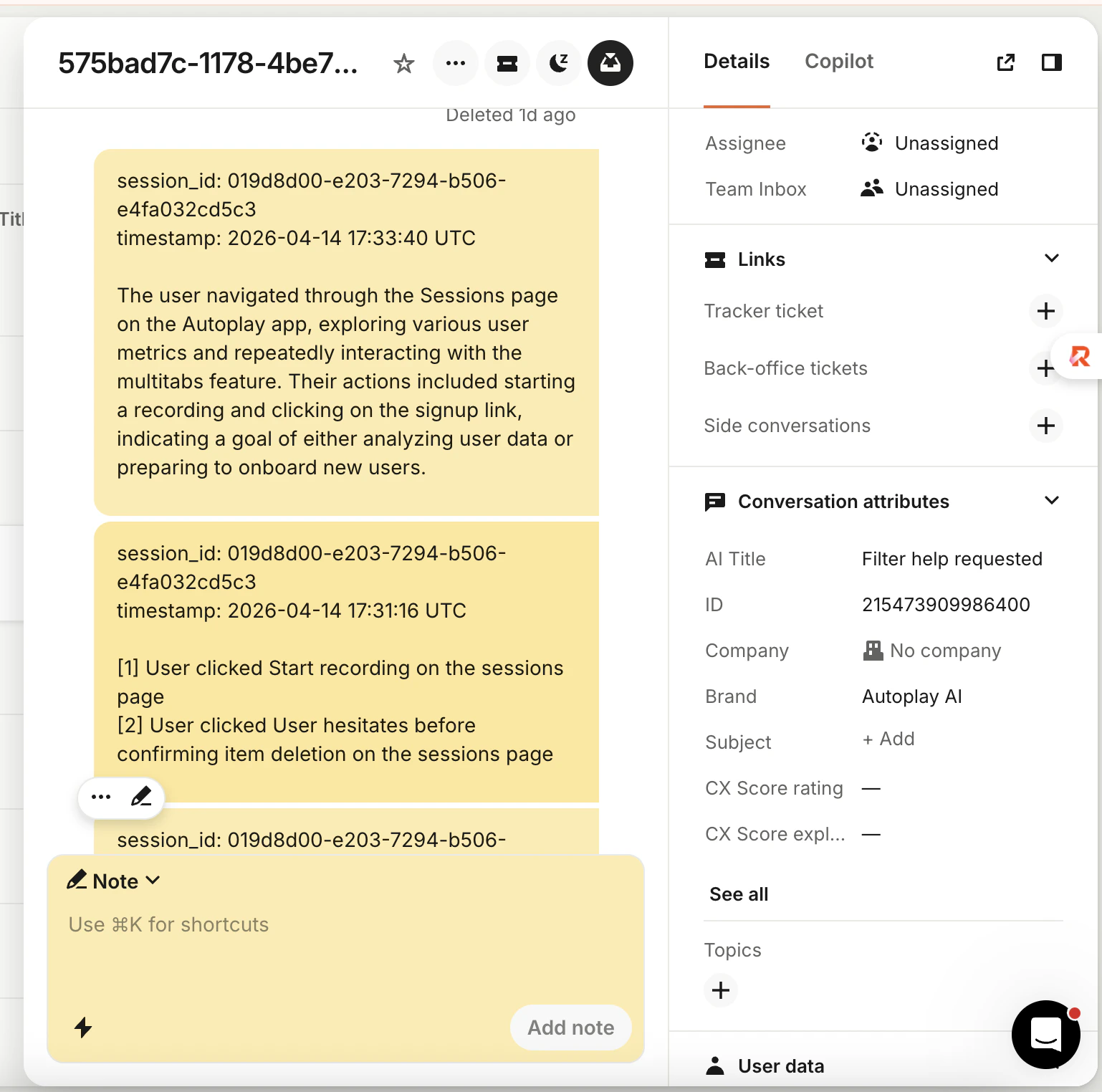 Notes are internal only (team-visible, not shown to the contact).
Action note — near real time, ~3 s bins:
Notes are internal only (team-visible, not shown to the contact).
Action note — near real time, ~3 s bins:
session_id: abc123
timestamp: 2024-01-15 12:34:50 UTC

[1] User clicked Sign up button on the pricing page
[2] User clicked Confirm plan button on the checkout page

[3] User submitted Payment form on the checkout page
session_id: abc123
timestamp: 2024-01-15 12:40:00 UTC

The user navigated to the pricing page and selected the Pro plan.
They completed checkout and then visited the billing settings page
to update their payment method.
Prerequisites
Complete the Quickstart. You should have:
- PostHog in the browser — snippet, API key,
product_id on identify (and email after login if you use it)
- Connector credentials — URL, API token, stream URL (e.g.
https://your-connector.onrender.com/stream/ plus your product id from the dashboard) — used in Step 2 only for the Autoplay stream, not as Intercom’s webhook Endpoint URL
autoplay-sdk installed — and a successful test stream from the Quickstart- A public HTTPS URL you control — for Intercom to
POST webhook payloads to (separate from the PostHog destination URL and separate from any Autoplay chatbot-webhook path)
Your backend must know when a user starts or replies to a conversation so you can link the PostHog session to that conversation (in memory / your DB and in the conv_map you use in Step 2).
Register these topics on your webhook endpoint:
conversation.user.created — new conversationconversation.user.replied — reply in an existing thread
The first successful session ↔ conversation link is sticky.
POSTs)—not your Autoplay stream URL and not your PostHog destination URL.
In Intercom’s webhook form, set Endpoint URL to the full HTTPS URL of your handler (for example the INTERCOM_WEBHOOK_URL you print in the snippet below).
| Field | Value |
|---|
| Endpoint URL | Your public HTTPS webhook URL (scheme + host + path your server exposes). |
| Topics | Every topic in INTERCOM_WEBHOOK_TOPICS (see snippet below). |
import os

from autoplay_sdk.integrations.intercom import INTERCOM_WEBHOOK_TOPICS

# Subscribe to every topic Intercom lists here (copy into Developer Hub).
print(INTERCOM_WEBHOOK_TOPICS)

# Example: build the URL you paste into Intercom → Endpoint URL
_base = os.environ.get("YOUR_PUBLIC_API_BASE", "https://api.example.com").rstrip("/")
_path = os.environ.get("INTERCOM_WEBHOOK_PATH", "/webhooks/intercom")
INTERCOM_WEBHOOK_URL = f"{_base}{_path}"
print(INTERCOM_WEBHOOK_URL)
X-Hub-Signature-256 header and your app’s client_secret (Developer Hub → Your app → Basic information). Keep the secret in your environment only.
Parse link-eligible payloads to obtain conversation_id and resolve session_id (from conversation metadata, user identity, or how you already tie PostHog to logged-in users). Feed those pairs into conv_map in Step 2 and call await writer.on_session_linked(session_id, conversation_id) once linked so BaseChatbotWriter can flush any pre-link buffer.
Connector-hosted Intercom webhooks (intercom_chatbot_webhook_url, POST /chatbot-webhook/{product_id}) are not part of this recipe—see Intercom integration if Autoplay receives Intercom traffic on your behalf.
Step 2 — Consume the event stream and post to Intercom
Step 1 delivers conversation lifecycle events to your server. The same backend (or a sibling worker) opens Autoplay’s stream and uses AsyncAgentContextWriter to turn ActionsPayload into internal Intercom notes via the REST API.
Use BaseChatbotWriter and AsyncAgentContextWriter from autoplay-sdk. The SDK handles buffering, debouncing, and summarisation; you implement two Intercom calls:
_post_note — post an internal admin note; return part_id for redaction_redact_part — blank an old note when a summary replaces it
With this pattern you wire write_actions and overwrite_with_summary because your code receives ActionsPayload from the stream. Autoplay’s default connector posts raw notes via forward_batch and passes write_actions=None into IntercomChatbot.make_agent_writer — see Chatbot writer.
Implement IntercomWriter
import httpx
from autoplay_sdk.chatbot import BaseChatbotWriter
from autoplay_sdk.integrations.intercom import INTERCOM_WEBHOOK_TOPICS

_INTERCOM_VERSION = "2.11"
ACCESS_TOKEN = "your-intercom-access-token"
ADMIN_ID = "your-admin-id"

http = httpx.AsyncClient(
    base_url="https://api.intercom.io",
    headers={
        "Authorization": f"Bearer {ACCESS_TOKEN}",
        "Accept": "application/json",
        "Intercom-Version": _INTERCOM_VERSION,
    },
)


class IntercomWriter(BaseChatbotWriter):
    SESSION_LINK_WEBHOOK_TOPICS = INTERCOM_WEBHOOK_TOPICS

    async def _post_note(self, conversation_id: str, body: str) -> str | None:
        r = await http.post(
            f"/conversations/{conversation_id}/parts",
            json={
                "type": "admin",
                "admin_id": ADMIN_ID,
                "message_type": "note",
                "body": body,
            },
        )
        if r.is_success:
            parts = r.json().get("conversation_parts", {}).get("conversation_parts", [])
            return str(parts[-1]["id"]) if parts else None
        return None

    async def _redact_part(self, conversation_id: str, part_id: str) -> None:
        await http.post(
            "/conversations/redact",
            json={
                "type": "conversation_part",
                "conversation_id": conversation_id,
                "conversation_part_id": part_id,
            },
        )
- Access token — Developer Hub → Your app → Authentication
- Admin ID — Teammates, or Admins API
Wire AsyncAgentContextWriter
import asyncio
from collections import defaultdict
import openai
from autoplay_sdk import AsyncConnectorClient, AsyncSessionSummarizer
from autoplay_sdk.agent_context import AsyncAgentContextWriter

async_openai = openai.AsyncOpenAI()

conv_map: dict[str, str] = {}
part_ids: dict[str, list[str]] = defaultdict(list)

writer = IntercomWriter(product_id="your-product-id")


async def write_actions_cb(session_id: str, text: str) -> None:
    conv_id = conv_map.get(session_id)
    if not conv_id:
        return
    part_id = await writer._post_note(conv_id, text)
    if part_id:
        part_ids[session_id].append(part_id)


async def overwrite_cb(session_id: str, summary: str) -> None:
    conv_id = conv_map.get(session_id)
    if not conv_id:
        return
    await writer._post_note(conv_id, summary)
    old = part_ids.pop(session_id, [])
    if old:
        await asyncio.gather(*[writer._redact_part(conv_id, pid) for pid in old])


async def llm(prompt: str) -> str:
    r = await async_openai.chat.completions.create(
        model="gpt-4o-mini",
        messages=[{"role": "user", "content": prompt}],
        temperature=0.3,
        max_tokens=256,
    )
    return r.choices[0].message.content


summarizer = AsyncSessionSummarizer(llm=llm, threshold=20)

agent_writer = AsyncAgentContextWriter(
    summarizer=summarizer,
    write_actions=write_actions_cb,
    overwrite_with_summary=overwrite_cb,
    debounce_ms=0,
)
Connect to the stream
CONNECTOR_URL = "https://your-connector.onrender.com/stream/your-product-id"
API_TOKEN = "your-api-token"

async with AsyncConnectorClient(url=CONNECTOR_URL, token=API_TOKEN) as client:
    client.on_actions(agent_writer.add)
    await client.run()
conv_map from the handler you registered in Step 1 (same session_id → conversation_id pairs). Call await writer.on_session_linked(session_id, conversation_id) after each successful link so BaseChatbotWriter can flush its pre-link buffer before you rely on live write_actions traffic from the stream.